Merova: A Versatile Serif Font for Design Excellence
If you're looking for a font that combines elegance with flexibility, Merova might just be the perfect choice. Designed as a classic serif typeface, Merova offers a timeless aesthetic that works well in both print and digital media. Its versatility makes it ideal for logos, presentations, branding materials, and more. But before diving into its features, it's important to understand what makes Merova unique and how to use it effectively.
What Is Merova?
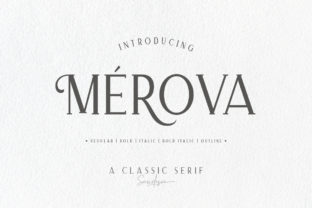
Merova is a serif font that blends traditional design elements with modern usability. It comes in five distinct styles, each offering a different character feel while maintaining the core elegance of the typeface. This variety allows designers to tailor their typography to specific projects without sacrificing consistency or quality.
One of the standout features of Merova is its extensive character alternates. These include ligatures, swashes, and stylistic variations that can transform a simple text block into something visually striking. Whether you're creating a logo, a website, or a marketing campaign, these alternates give you the tools to make your design stand out.
Common Mistakes When Using Merova
While Merova is a powerful tool, many users make mistakes when selecting and applying it. Understanding these common errors can help you avoid pitfalls and achieve better results.
Mistake 1: Choosing the Wrong Style
Merova has five styles, each with its own character weight and visual impact. Some users mistakenly assume all styles are interchangeable, but this isn't the case. For example, using a bold style for body text can make it difficult to read, while a lighter style might not convey the necessary authority in a logo.
Tip: Always consider the purpose of your design. Use the appropriate style based on the context—whether it's for headings, body text, or decorative elements.
Mistake 2: Overusing Alternates
Merova’s alternates are a great feature, but they can easily become overwhelming if used excessively. Too many swashes or ligatures can distract from the message and make the text look cluttered.
Tip: Use alternates sparingly and intentionally. Apply them where they enhance readability or add visual interest, not just for the sake of aesthetics.
Mistake 3: Ignoring Readability
Even though Merova is elegant, it's essential to prioritize readability. Some users may choose it for its beauty without considering how it looks at smaller sizes or in different environments.
Tip: Always test your design across various screen sizes and resolutions. Ensure the font remains legible in both print and digital formats.
How to Choose the Right Merova Style
Choosing the right style of Merova depends on your project’s goals. Here’s a breakdown of the five styles and their best use cases:
- Style 1: Best for formal documents, invitations, and branding that requires a refined, traditional look.
- Style 2: Ideal for creative projects, such as posters, social media graphics, and web banners.
- Style 3: Suitable for body text in magazines, reports, and educational materials.
- Style 4: Perfect for logos and titles where a bolder, more dramatic appearance is desired.
- Style 5: Great for decorative purposes, like headers, callouts, and special text effects.
By matching the style to the content, you ensure that your design communicates effectively while maintaining visual appeal.
Practical Tips for Using Merova Effectively
To get the most out of Merova, follow these practical tips:
- Use Consistency: Stick to one or two styles within a project to maintain visual harmony.
- Balance Decorative Elements: Limit the use of alternates to key areas like headlines or accents.
- Test Across Platforms: Check how Merova appears on different devices and platforms to ensure cross-compatibility.
- Consider Pairing: Combine Merova with complementary sans-serif fonts for a balanced typographic layout.
- Read the Fine Print: Review licensing terms carefully, especially if you plan to use Merova commercially.
These steps will help you avoid common issues and ensure that your use of Merova is both effective and professional.
What to Check Before Finalizing Your Choice
Before deciding on Merova, there are several factors to consider:
- License Type: Determine whether the font is free for commercial use or requires purchase.
- Character Set: Ensure the font includes the characters you need, especially if you're working with multiple languages.
- Font Weight Options: Confirm that the selected style supports the required weights for your design.
- Technical Compatibility: Verify that the font works well with your design software and output formats.
- User Experience: Think about how the font will be perceived by your audience—will it convey the intended tone and message?
By evaluating these aspects, you can make an informed decision that aligns with your project's needs and goals.
Conclusion
Merova is a versatile and elegant serif font that offers a wide range of design possibilities. With its five styles and character alternates, it's a valuable asset for any designer. However, to truly harness its potential, it's crucial to understand its strengths and limitations. By avoiding common mistakes and making thoughtful choices, you can create designs that are both beautiful and functional. Whether you're a beginner or a seasoned professional, Merova can elevate your work with its timeless appeal and adaptability.